WHAT’S = reusable dock
The carrier you clip, keep and use again.
 WHAT’S?
PROTOTYPE 03 / THE NEXT CHAPTER
Swap → Tap → Discover
WHAT’S is the reusable dock you keep. A WHAT is the collectible NFC object you swap — a feeling, a signal, a tiny piece of personality with a digital life.
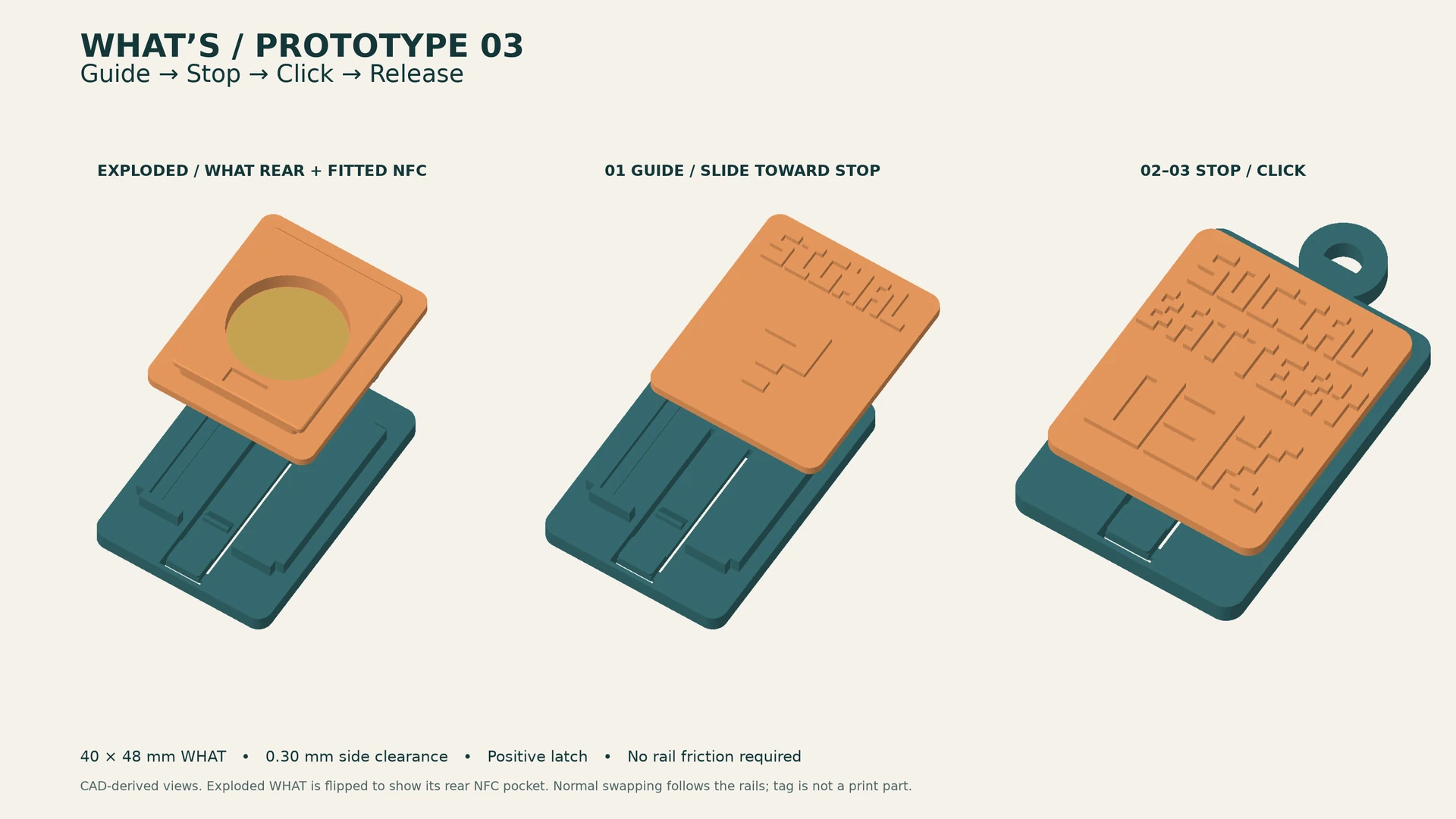
Built from what we learned with Prototype 02: guide rails, a positive latch and a deliberate press-to-release action. The new design is ready for supplier review; physical testing comes next.
Each WHAT says something before the tap and reveals something different after it. Collect a mood. Swap a state. Share the discovery.
A live recharge moment after the tap.
WHAT / 02A tiny pause for a very busy mind.
WHAT / 03A digital error with a human punchline.
WHAT / 04A visible boundary and a quiet digital room.
WHAT / 05A note, song or memory for someone specific.
SWIPE TO SEE ALL FIVE WHATs →
ONE SIMPLE PRODUCT RULE
The names matter because the roles are different. WHAT’S is the reusable physical platform. The WHAT is the expressive, swappable object with its own NFC identity.
The carrier you clip, keep and use again.
The feeling, design and digital response you choose.
Slide a WHAT in until the latch engages. Press the release pad to swap it out. Your physical signal changes with it.
Bring a compatible phone close. The passive NFC tag needs no battery.
Open a response made for that WHAT — playful, personal or surprising.
BRING YOUR PHONE CLOSE
Every WHAT carries its own NFC identity. Bring your phone close to the installed WHAT and its matching digital experience opens—no battery in the WHAT and no complicated setup.

SWIPE THE PHONE INTERACTION VISUAL TO EXPLORE →
Choose a collectible and slide it into the reusable dock.
Hold the back of a compatible phone near the WHAT.
The passive tag inside that WHAT is read instantly.
Your phone opens digital content matching the installed WHAT.
PROTOTYPE 03 / PHYSICAL × DIGITAL × YOURS
Guide. Stop. Click. Release. Prototype 03 gives retention its own spring latch, so swapping no longer depends on a tight rail fit. Each WHAT keeps its own NFC identity. The next physical test will check the click, release feel and repeated swapping.
PROTOTYPE 03
New CAD views show how the dock guides and holds the WHAT. The spring latch is designed to click into place, then release with a press.
EARLY ACCESS / STAY CURIOUS
Prototype 02 is in our hands. Prototype 03 is the next step.